
Name the responsibilities
Discuss the work each person is responsible for before choosing a role for them in the workspace.
Use owner, admin, coach, assistant and read-only roles to support the way your team works together.
Every coaching feature is included in every plan. Choose the client and team capacity you need.
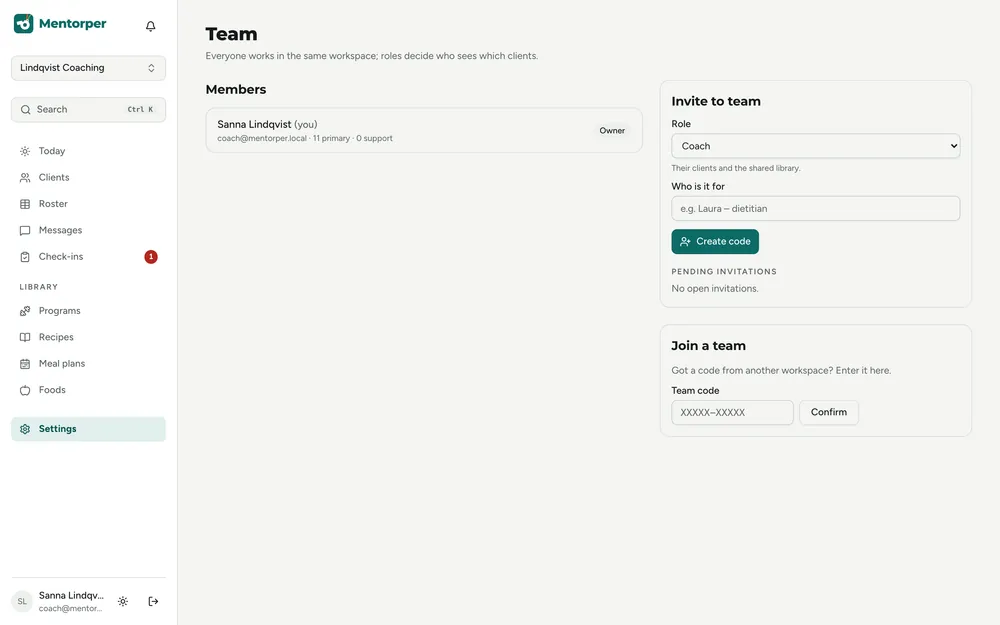
A team needs a shared understanding of who does what. Use Mentorper’s roles to connect the workspace setup with your agreed responsibilities.
Discuss the work each person is responsible for before choosing a role for them in the workspace.
Work with owner, admin, coach, assistant and read-only roles when organising your coaching practice.
Team roles are included in every plan. Check the pricing page for the seats available in each plan.
A practical way to use this capability in your coaching.
Identify who is involved and what responsibilities they will have.
Choose a setup that fits those responsibilities using the available roles.
Review the team setup when responsibilities change, keeping client sharing choices in mind.
Clear responsibilities give the team a shared reference for its work. Choose roles around that agreement and revisit the arrangement when the practice changes.
Clients choose which information to share. Consider the team arrangement alongside those choices, so the working context stays clear to everyone involved.
Choose roles around the responsibilities your team agrees on.
Mentorper includes owner, admin, coach, assistant and read-only roles. Choose roles with your team’s agreed responsibilities in mind.
No. Roles are included in every plan. The number of team seats differs by plan and is shown on the pricing page.
Try the full workspace with a 30-day Pro trial. No card needed.